Using the virtual instructor, the instructor can set up customized, time-based limits for variables to be monitored during training sessions. The instructor can add any process variable from the simulator. For each second the variable is not within the specified limits the score for the variable will reduce. The weight for each variable is also considered in the total score calculation. When the score for a variable reaches the aborting score value the simulation will stop and the trainee needs to restart the scenario.
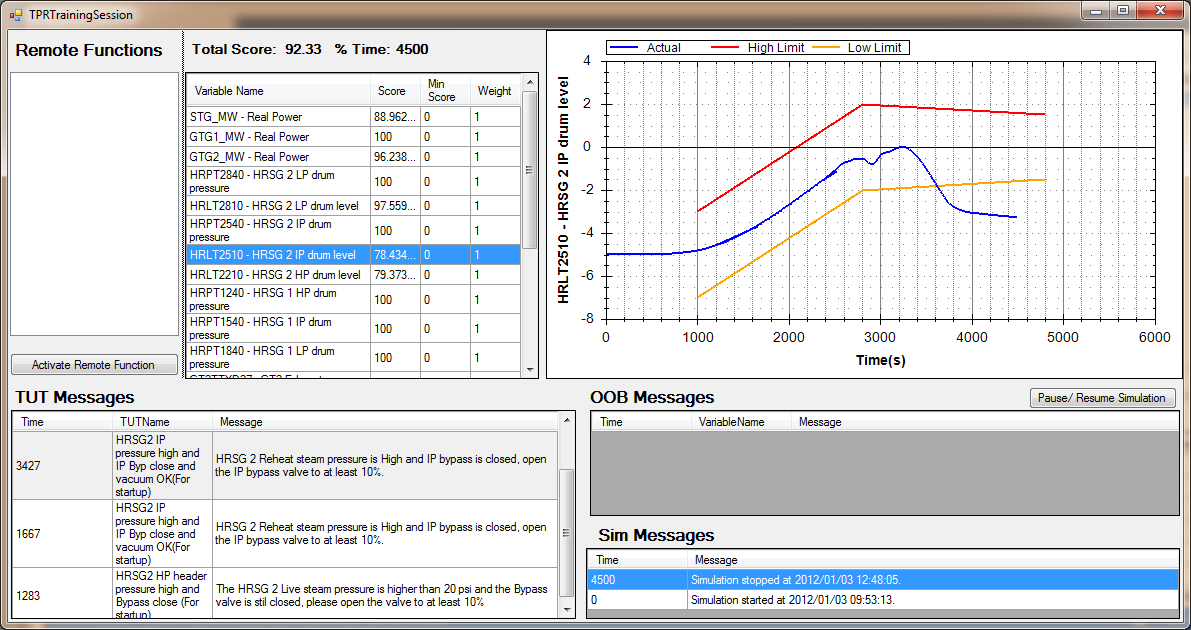
This feature allows the instructor to define ranges for critical parameters that will cause the simulator to stop/freeze if the trainee allows any of those variables to go out of the defined range during a training session. There is also a messaging system that warns the trainee if a parameter is nearing an out-of-bounds condition. Each time the trainee gets an OOB message he will lose 2% of his total score. (Customizable according to user requirements)
This feature allows the Instructor to define rules or hints that will help and steer the trainee during a training session. The rule/hint will typically monitor a few process variables concurrently and based on their combined values recommend one or more actions to the trainee. Each time the trainee gets a TUT message he will lose 1% of his total score. (Customizable according to user requirements)
All the data above are stored and the instructor can look at the results from the training session in his own time, he can also view the history of the same trainee over a time and see where the trainee has improved or if the trainee keeps making the same mistakes. All trends from the training session is also stored for later viewing and analysis by the instructor.
The Instructor can initiate an event recording system which will record all actions. The recording can be used for reporting, or saved as a scenario for future use or it can be edited and only certain of the actions used to create a custom scenario.
Action that are recorded, include the following
Instructors can therefore set up their own scenarios, and/or have some set up (by SimGenics) during commissioning of the simulator.